
FOREX BOSON | ATLAS COLLECTION | FREE EDITION
Quantitative Momentum Analytics
A systematic framework for understanding directional momentum, momentum development and statistical extensions. MetaTrader 5 | Analytical indicator | Free edition.
Overview
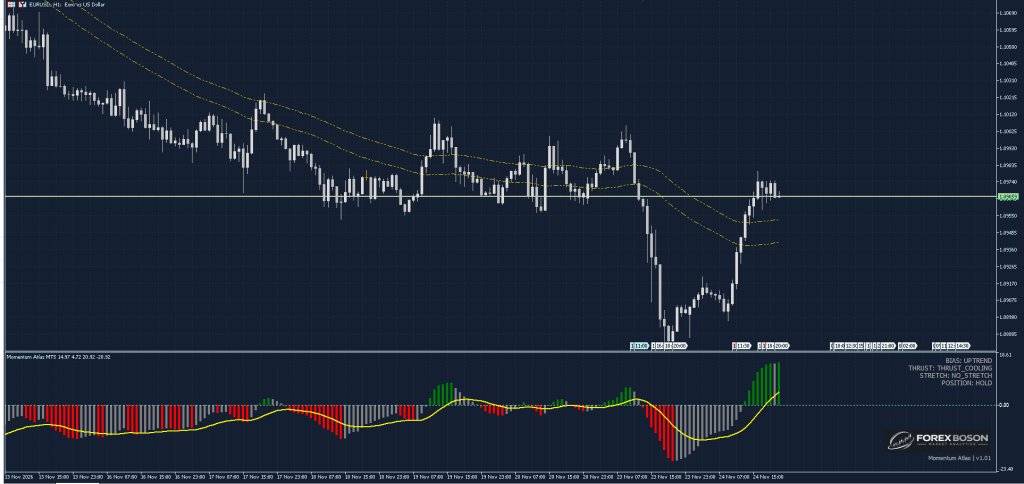
Momentum Atlas MT5 evaluates short- and long-horizon moving-average relationships, normalized by market volatility. The histogram, smoothed reference and adaptive statistical analysis provide context for independent market analysis, not trading instructions.
Core Analytical Features
| Feature | Purpose |
|---|---|
| Multi-horizon momentum | Assess directional momentum across multiple observation horizons. |
| Volatility normalization | Reduce dependence on absolute price levels. |
| Adaptive statistical analysis | Evaluate momentum relative to its historical distribution. |
| Momentum development | Distinguish expansion and cooling. |
| Market intelligence dashboard | Summarize bias, thrust, stretch and position context. |
Product Interface
Figure 1. Momentum Atlas MT5 v1.01 on EURUSD H1. Other overlays in the main chart are not included.
How to Read Momentum Atlas MT5
1. Understanding the Momentum Histogram
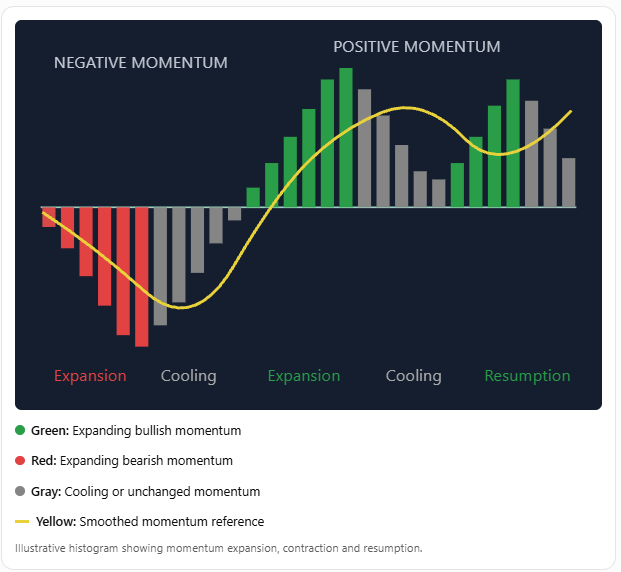
The zero level separates positive and negative momentum. Green means positive and increasing momentum; red means negative and increasingly negative momentum; grey denotes cooling, unchanged or otherwise non-expanding momentum. Yellow represents the smoothed momentum reference.
Figure 2. Illustrative expansion, cooling and resumption.
2. Positive Momentum Expansion
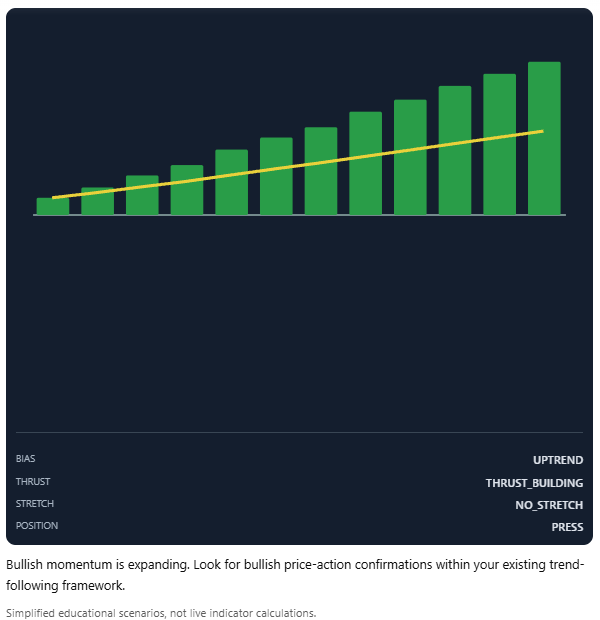
Positive and increasing values describe expanding bullish momentum, not a guarantee of price appreciation.
Figure 3. Simplified educational scenario: positive momentum expansion.
| Dimension | Illustrative state |
|---|---|
| BIAS | UPTREND |
| THRUST | THRUST_BUILDING |
| STRETCH | NO_STRETCH |
| POSITION | PRESS |
3. Negative Momentum Expansion
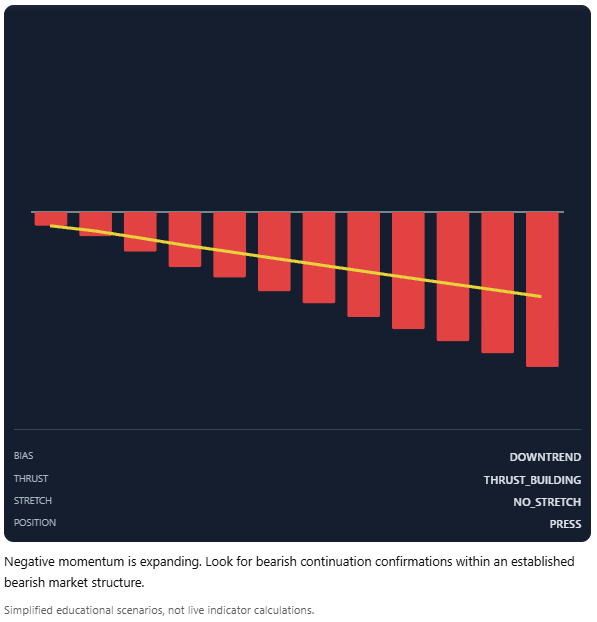
Negative and increasingly negative values describe expanding bearish momentum, not a guarantee of price depreciation.
Figure 4. Simplified educational scenario: negative momentum expansion.
| Dimension | Illustrative state |
|---|---|
| BIAS | DOWNTREND |
| THRUST | THRUST_BUILDING |
| STRETCH | NO_STRETCH |
| POSITION | PRESS |
4. Momentum Cooling
Positive momentum can weaken while remaining positive. Cooling may accompany consolidation or retracement and does not establish a reversal.
Figure 5. Simplified educational scenario: momentum cooling.
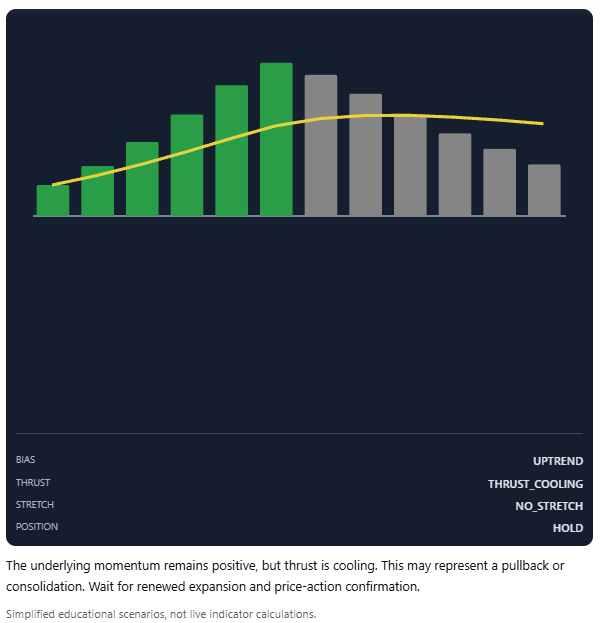
| Dimension | Illustrative state |
|---|---|
| BIAS | UPTREND |
| THRUST | THRUST_COOLING |
| STRETCH | NO_STRETCH |
| POSITION | HOLD |
5. Statistical Extension and Exhaustion
Extended momentum accompanied by weakening thrust may be classified as exhaustion. REVERSAL_SETUP describes an analytical condition, not a confirmed reversal.
Figure 6. Simplified educational scenario: statistical extension and exhaustion.
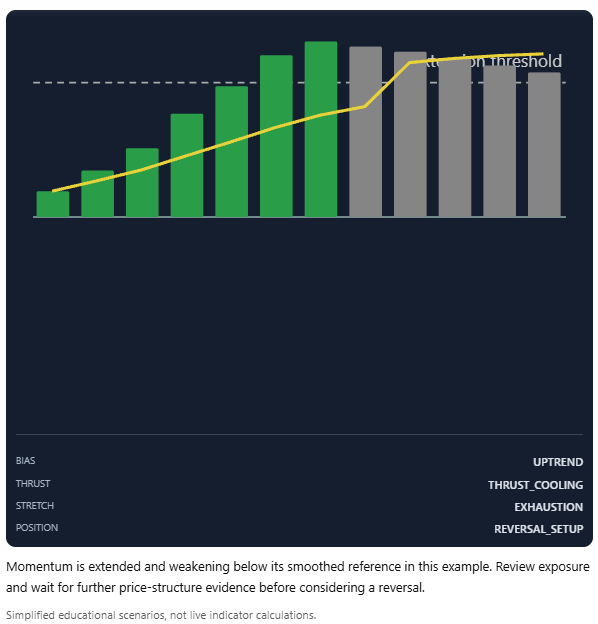
| Dimension | Illustrative state |
|---|---|
| BIAS | UPTREND |
| THRUST | THRUST_COOLING |
| STRETCH | EXHAUSTION |
| POSITION | REVERSAL_SETUP |
Market Intelligence Dashboard
| Dimension | Classification and meaning |
|---|---|
| BIAS | UPTREND: positive momentum; DOWNTREND: negative momentum; RANGE: neutral. |
| THRUST | THRUST_BUILDING: strengthening; THRUST_COOLING: not meeting strengthening criteria. |
| STRETCH | NO_STRETCH: no qualifying extension; STRETCHED: statistical extension; EXHAUSTION: extension with weakening momentum. |
| POSITION | PRESS: qualifying strengthening momentum; HOLD: directional context without another qualifying state; DEFEND: extended conditions; REVERSAL_SETUP: qualifying extended and weakening conditions; WAIT: neutral context. |
POSITION is an analytical classification, not a real account position or order instruction. The illustrations are simplified educational scenarios, not live calculations. Any trading-oriented wording within them is illustrative and not a recommendation.
Technical Specifications
| Specification | Details |
|---|---|
| Platform | MetaTrader 5 |
| Type | Custom analytical indicator |
| Markets | Instruments with suitable historical data |
| Timeframes | Standard MT5 chart timeframes |
| Automated trading | No |
| Distribution | Compiled EX5; source code not included |
| Price | Free |
Installation Instructions
Download and extract the official release package. In MetaTrader 5 select File → Open Data Folder → MQL5 → Indicators. Copy the EX5 into that folder, refresh Navigator or restart MT5, then attach the indicator to a chart. For MQL5 Market editions use the official Market installation procedure.
Software Licence
Free availability does not transfer intellectual property rights. Use is subject to the applicable software licence. Unauthorized commercial redistribution, resale and misrepresentation are not permitted, subject to applicable law.
Download Momentum Atlas MT5
Free Edition
Momentum Atlas MT5 — Version 1.01
MetaTrader 5 | EX5 | ZIP Package
Request your free copy of Momentum Atlas MT5. The official download link will be delivered to your email address.
No purchase. No customer account. No newsletter subscription.
Download Procedure
- Click Request Free Download.
- Enter your email address and select the product.
- Complete the required acknowledgment.
- Submit your request.
- Receive your official download link by email.
Requests are processed automatically at scheduled intervals. Delivery may be delayed during periods of high demand. Please check your spam folder before submitting another request.
Repeated requests for the same product within 24 hours may be suppressed to prevent duplicate emails.
Your email address is collected to fulfil your download request. Please review our Privacy Policy, Terms of Use and Risk Warning.
Technical Support
For installation or documented functionality assistance, visit our Support page.
Financial Risk Disclosure
Momentum Atlas MT5 provides analytical information, not personalized investment advice or automated trading. Statistical observations do not guarantee future results. Trading involves financial risk. Review our Risk Warning and Terms of Use.
